AI Typography Generator: Text in Your Images, Actually Readable
Wordmarks, posters, titles, lettering: describe the words and the style in plain English and Promly renders crisp, legible type that most AI tools turn to gibberish. No prompt syntax.
No credit card · 15 Pixels free on sign-up

In short
How does Promly put readable text in images?
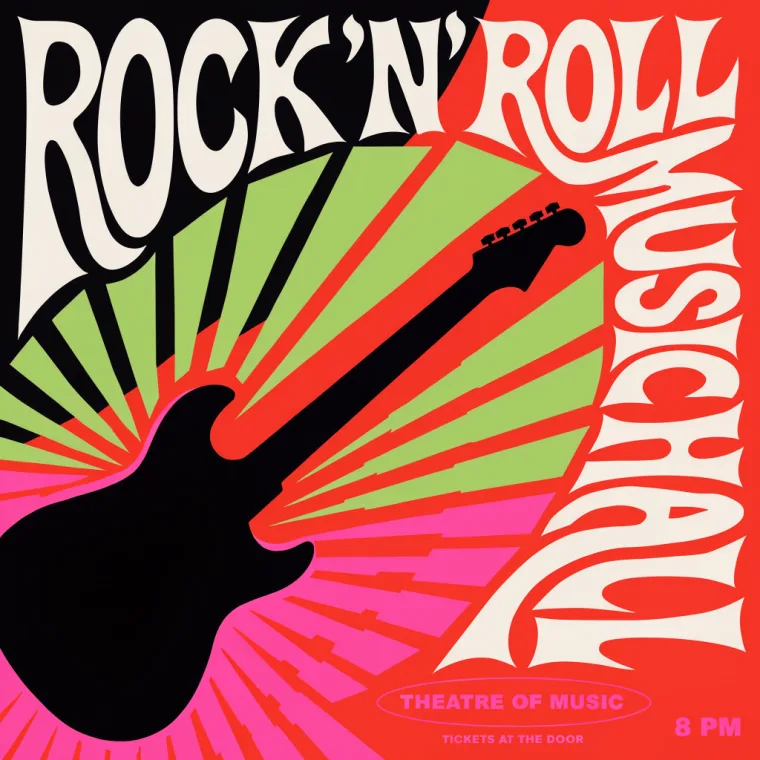
Type the exact words in quotes and the look you want (“a 1950s diner poster that says ROCK ’N’ ROLL”) in Create anything, Promly's Direct Kit. Promly sends it to a model that renders type well: GPT Image 2.5 by default (2 Pixels), or Ideogram, Grok Imagine 2 and Nano Banana Pro (4–5 Pixels). Short text comes out cleanest.
| You type | The exact words, in quotes, plus the style |
| Where | Create anything (the Direct Kit): one model, or several side by side |
| Models for text | GPT Image 2.5 (2 Pixels) · Ideogram (4) · Grok Imagine 2 (4) · Flux · Flex (4) · Nano Banana Pro (5) |
| Hebrew text | GPT Image 2.5, Nano Banana and Grok Imagine 2. Not Ideogram or Seedream |
| Works best for | A word to a few short lines: wordmarks, posters, titles, quotes |
| Free to start | 15 Pixels on sign-up, no credit card: about seven designs on the default model |
| Rights | Yours, for personal or commercial use (Promly's Terms) |
Prices checked 26 October 2026. Other models cost 1–5 Pixels a picture. Pixel packs from $12 for 50 · plans from $7 a month for 30.
How it works
Three steps, zero prompt syntax
Describe the text & look
Say the words you want and the style: “a 1950s diner poster that says ROCK ’N’ ROLL.” Plain language, no syntax.
Promly renders it
Promly generates the design with your text rendered crisply: readable letters and clean lettering, not AI gibberish.
Download & use
Use it for posters, social graphics, album and event art, merch or a wordmark. Re-roll until the type is just right.
Why people use it
The text comes out readable: the hard part of AI images
- No prompt skills needed. Describe the words and the look like you'd tell a friend: Promly handles the prompt engineering behind the scenes.
- Text that's actually legible. Titles, names and short phrases come out clean and readable: the thing most AI image tools get wrong.
- Wordmarks, posters & titles. Calligraphic logos, retro posters, concert art, bold headlines: name the style in plain words.
- You choose the exact words. Type the text you want in your description and Promly puts it in the design.
- Any visual style. Vintage, psychedelic, 3D, hand-lettered, minimal: describe the era or vibe and Promly matches it.
- Free to start. 15 Pixels on sign-up, no credit card: enough to make your first design.


FAQ
Frequently asked questions
Do I need to know how to write prompts?
No. That's the whole point of Promly. You describe the text and the style in plain English and Promly builds the prompt for you. There's no prompt syntax to learn.
Can AI really render text correctly?
Short text does come out clean and legible in Promly: wordmarks, poster headlines, titles and a line or two of copy. Type the exact words in your description; for very long paragraphs, keep the text short and re-roll for the sharpest result.
What can I make?
Posters, wordmarks and logos, event and concert art, album covers, quotes, titles and headlines: anything where the words are part of the picture.
Can I choose the exact wording?
Yes. Put the exact text in your description (“a poster that says …”) and Promly renders those words in the design.
Is it free?
Free to start: 15 Pixels on sign-up, no credit card. A design costs 2 Pixels on the default model (GPT Image 2.5) and 4–5 on the text specialists, so the free Pixels make three to seven designs. After that, Pixel packs start at 50 Pixels for $12 (they last 12 months), or plans at $7 a month for 30 Pixels.
Which model is best for text in images?
Start with GPT Image 2.5, the default: it follows exact wording well and costs 2 Pixels. For logo-style lettering try Ideogram; for the most literal text, Grok Imagine 2 (both 4 Pixels). Running two or three in one comparison is the quickest way to see which one gets your words right.
Can it write Hebrew text in images?
Yes. GPT Image 2.5, the Nano Banana models and Grok Imagine 2 render Hebrew lettering, and Promly has a Hebrew-first prompt path for it. Ideogram and Seedream do not handle Hebrew. We test Hebrew specifically; for other scripts, try two models side by side.
Can I use what I make commercially?
Yes. Under Promly's Terms the images you generate are yours to use for any purpose, personal or commercial. The image models' own licence terms also apply.
Make your first design free
Describe the words and the style in plain English and Promly renders clean, readable type: posters, wordmarks, titles and more. 15 Pixels on sign-up, no credit card.
Start free · 15 PixelsExplore more
Other ways to create with Promly
All Promly tools and prices · Guide: Which AI image model to use · AI Infographic Generator · AI Story Generator · AI Photo Variations Generator · AI Reel Maker · AI Sticker Maker · Compare AI Image Models · Community gallery