AI Video Editor — Trim, Cut & Make Reels with Promly
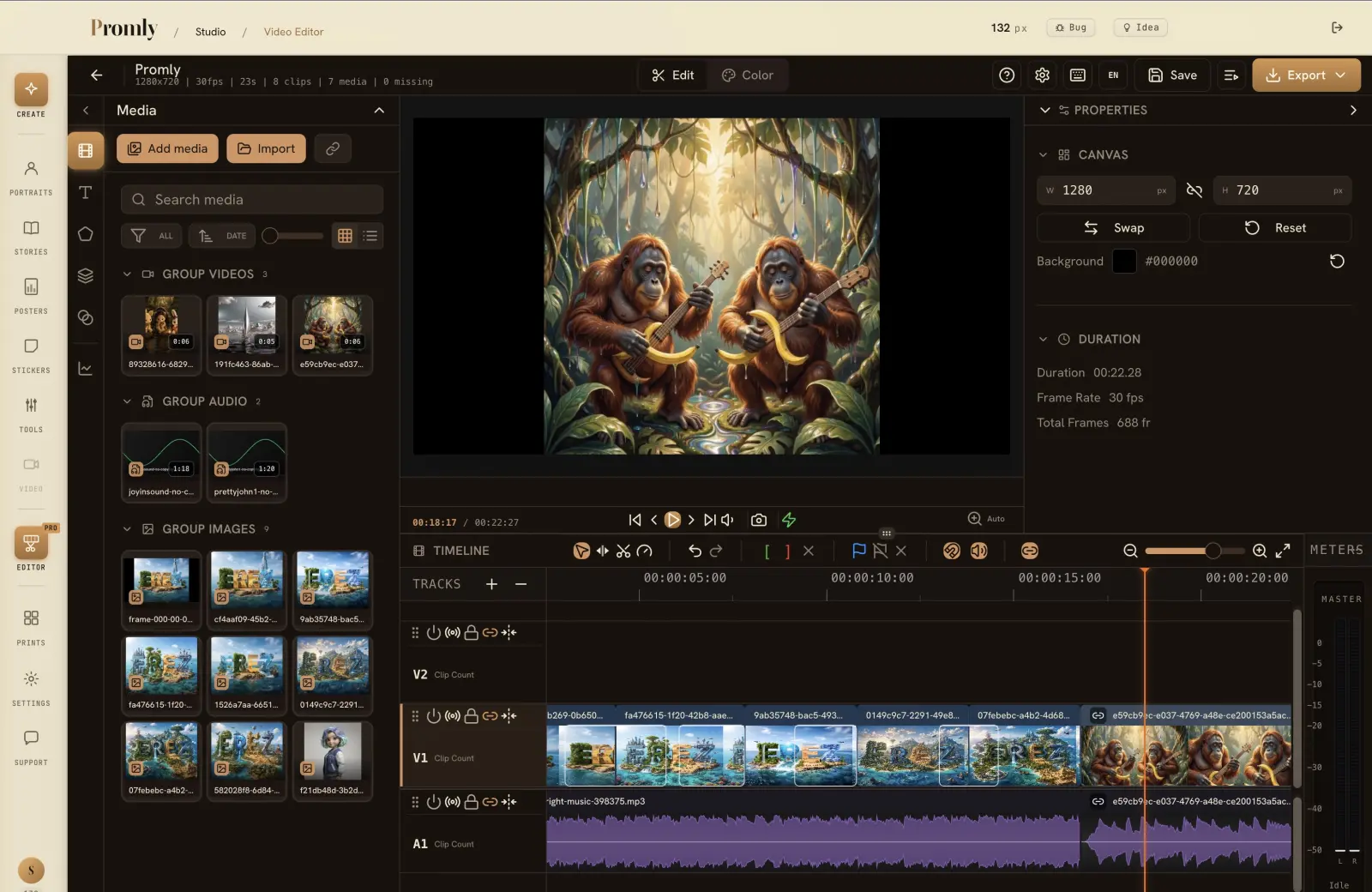
Edit video on a real multi-track timeline, right in your browser — trim, split and layer clips. Free for everyone on Promly, built to pair with AI image and reel generation.
Free for everyone · runs in your browser · nothing to install
How it works
From clips to a finished video, in the browser
Bring in your clips
Upload your own footage, photos and audio — or generate AI images and reels inside Promly and drop them straight onto the timeline.
Edit on the timeline
Trim, split, reorder and layer clips on a real multi-track timeline. Cut to the beat, stack overlays, fine-tune every frame.
Export & share
Render your video and download it to post to TikTok, Instagram Reels or YouTube Shorts.
Why people use it
A real editor — without the download
- Runs in your browser. Nothing to download or install — open a tab and start editing.
- A real multi-track timeline. Trim, split, reorder and layer video, images and audio — not just a template filler.
- Made for Reels & TikTok. Edit vertical video and export it ready to post to Reels, TikTok and Shorts.
- Pairs with AI generation. Make images and reels in Promly with zero prompting, then assemble them here.
- Bring your own footage. Mix your own video clips, photos and audio with anything you make in Promly.
- Free for everyone. Sign up free and the whole editor is yours, on the free plan too.
FAQ
Frequently asked questions
Is the video editor free?
Yes. The video editor is free for everyone on Promly, the free plan included. Sign up free (15 Pixels, no credit card) and open it from the Studio. Pixels are only spent when you generate new images or clips to edit.
Do I need to install or download anything?
No. The editor runs entirely in your browser — there's nothing to download, install or update. It works on modern desktop browsers.
What can I do in the editor?
Trim and split clips, arrange them across multiple tracks, layer images and audio over video, reorder your timeline, and export the finished video.
Can I make TikTok and Instagram Reels with it?
Yes. Edit vertical (9:16) video on the timeline and export it ready to post to TikTok, Instagram Reels and YouTube Shorts.
Can I use my own footage?
Yes. Upload your own video clips, images and audio — or use images and reels you generate in Promly. Mix and match on the same timeline.
How is this different from the AI Reel Maker?
The AI Reel Maker is free and auto-assembles a reel from your images with transitions in one click. The video editor, also free, gives you a full timeline to trim, split, layer and fine-tune by hand — for when you want manual control.
Make and edit reels with Promly
Generate images and reels with AI, then trim and assemble them on a real timeline. Start free with 15 Pixels, and the editor is free too.
Start free · 15 PixelsExplore more
Other ways to create with Promly
AI Reel Maker · AI Sticker Maker · AI Story Generator · AI Storyboard Generator · AI Comic Generator · AI Portrait Generator · AI Infographic Generator · Compare AI Image Models · Community gallery